
TL;DR
What I learned from Chicago: GPS lies early, Bluetooth hates crowds, notifications kill focus. But there are strategies to handle all of it.
The three-part solution for early miles:
1. GPS & Lap Strategy
Even with a good dual-band watch, Chicago's downtown will mess with your GPS a bit. It is not a disaster, but it is noisy enough that you should not rely on instant pace for the early miles.
How your GPS behaves downtown
In the first two screenshots from my 2024 race, you can see what "normal" downtown GPS drift looks like:
- • The red line wobbles around the city grid instead of tracing each street perfectly
- • Corners get rounded off
- • The route occasionally cuts through buildings or jumps a lane
This is what you should expect in the Loop and the blocks just outside it. Tall buildings, Lower Wacker, and narrow streets all make the watch guess.
How it looks once you are out of downtown
In the third screenshot, the line suddenly looks almost perfectly smooth and straight. That is what the rest of the course looks like once you are out of the core downtown area.
Open sky, fewer tall buildings, and long straight stretches mean your watch finally locks in. From here on, distance and pace are much more accurate.
How to pace around this
- • Use lap pace instead of instant pace for the first few miles. Instant pace will jump around downtown.
- • Trust the mile markers, not your watch distance. The markers are right. Your GPS is doing its best with bad conditions.
- • Good race-day screen: Distance, Lap Pace, Last Lap Pace, Heart Rate. That setup keeps you honest until the signal settles down.
For the exact watch setup I use on every run and race day, see the gear page.
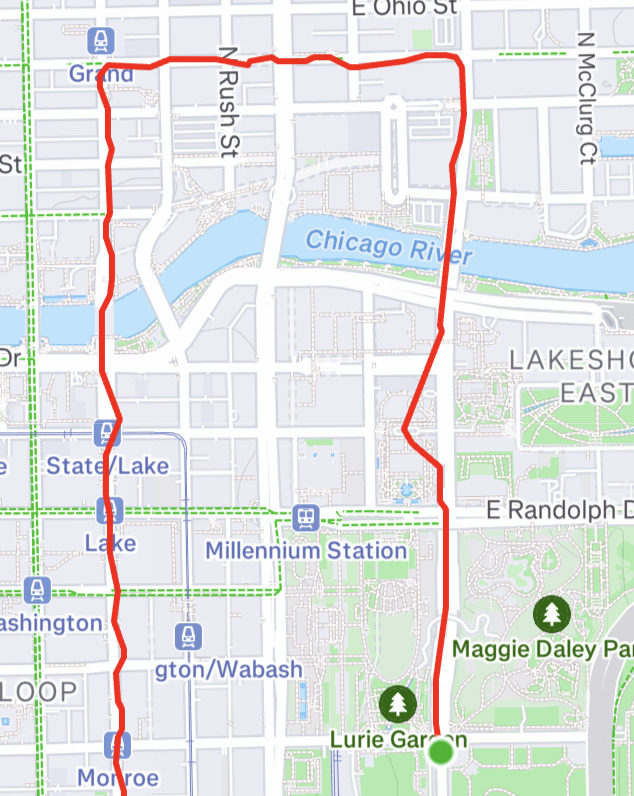
Downtown GPS drift - wobbles around the city grid
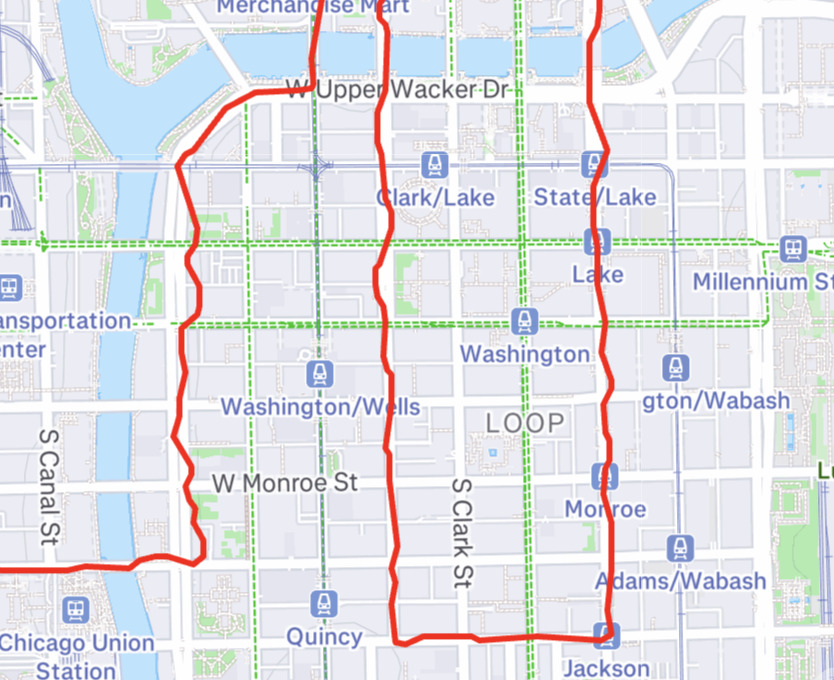
Corners rounded off, route cuts through buildings
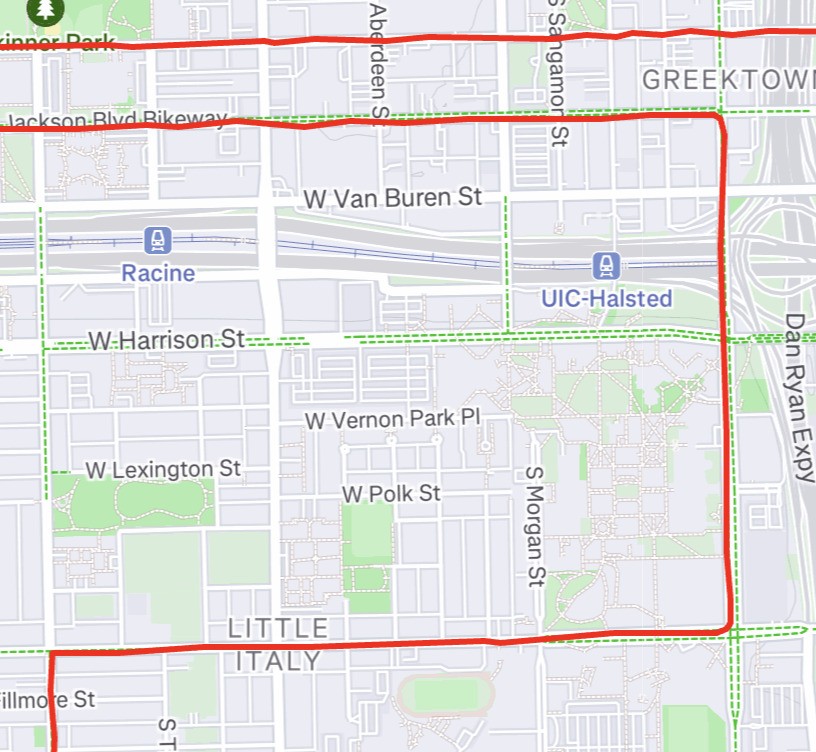
Outside downtown - smooth and accurate tracking
Auto-Lap vs Manual-Lap
Auto-Lap (leave it on):
- • Simple. Less to remember.
- • Works fine if you're OK with some early wonkiness.
- • "Auto lap and no auto lap don't affect your watch's ability to record the whole distance."
- • "I have auto lapped almost every single marathon I have run… it was consistently off but consistent."
Pro tip (from Reddit): If it's way off in the first few miles, hit the lap button once around mile 4, then let it roll.
Manual-Lap (press button every mile):
- • Higher accuracy relative to the course markers → fewer surprises.
- • "Manual. The only thing that matters during a race is your pace relative to race distance, not your GPS distance."
- • But it adds mental load (you need to hit every lap).
- • Works best if you practiced it. Redditors say: "Manual lapping might be useful… otherwise remembering to hit the lap button every mile marker … is a pain."
My take (based on experience):
Leave auto-lap on. Don't stress about splits unless it's wildly off. Your early miles will be wonky anyway (Lower Wacker, concrete canyons). For clarity, adding "last lap pace" + "current lap pace" to your screen is spot-on.
2. Know Your Splits Cold
Memorize your checkpoint times so you can sanity check your pace on race day.
Early Checkpoints
- • 5K (3.1 mi)
- • 10K (6.2 mi)
- • 15K (9.3 mi)
- • Half marathon (13.1 mi)
Late Checkpoints
- • 30K (18.6 mi)
- • 35K (21.7 mi)
Why this matters in city races
- • When your GPS is lying to you downtown, the course clocks aren't
- • You can reality-check your watch against actual mile markers
- • Gives you concrete checkpoints when your current pace screen is bouncing between 6:00 and 9:00/mile
Example: 3:30 marathon (8:00 per mile)
Early
Later
Pro tip:
Write these on your hand or arm with permanent marker. When you pass the 10K mat and hear "49:30," you know you're 12 seconds ahead regardless of what your watch says.
3. Use Pace Groups When GPS Fails
In the chaotic first miles, pace groups are your anchor.
Why pace groups work downtown:
- • They're pacing off course distance, not GPS
- • Experienced pacers know the course and won't panic over GPS wonkiness
- • Takes the mental load off you while your watch figures itself out
How to use them strategically:
- Find your target pace group in the corral (3:30, 4:00, etc.)
- Stick with them through mile 3-5 while GPS settles
- Use them as a reality check: "Does this feel like 8:00/mi pace?"
- Once GPS stabilizes and you know your actual effort, decide: stay with group, drop back, or push ahead
The catch:
- • Pace groups attract crowds - can be hard to navigate aid stations
- • Some pacers are better than others (they're human too)
- • Don't blindly follow if the effort feels wrong for you
"In Chicago, I started with the 3:30 group through the downtown chaos. Once my watch settled around mile 4-5 and I had my rhythm, I made my move. Those first few miles with the group kept me from chasing ghost paces on my watch."
The Three-Pronged Early Race Strategy:
- • Pace groups = human anchor while tech settles
- • Memorized splits = reality check at course markers
- • Accept GPS chaos = don't panic, don't chase bad numbers
4. Watch Faces That Make Sense
What I ran with:
Time | Distance | Avg pace | Current pace | HR
Then added: Last lap pace | Current lap pace
Why it works:
- • Time and distance = core info
- • Average & current pace = let you know how you're trending
- • Last lap & current lap pace = gives clarity once GPS stabilizes
- • HR is optional (in city races HR sensors can mess up too)
Bonus tip: Have a secondary screen hidden for "just in case" - maybe cadence or split timer - but keep your race screen clean.
5. Pre-Race Testing (Don't Skip This)
Practice Your Exact Setup
- • Do a dress rehearsal run 1-2 weeks before race day with all tech
- • Run in your city's downtown if possible - test GPS accuracy around tall buildings
- • Practice your watch screens, auto-lap vs manual-lap decision
- • Test notification settings during a weekend run when family might text
What to test specifically:
- • Does your watch screen work in bright sun vs shadows?
- • Can you glance at your watch while running in a crowd safely?
- • Do your headphones stay connected in crowded areas?
- • Does your HR sensor stay put after 10+ miles?
If you don't test it in similar conditions, race day will surprise you.
6. Headphones & Bluetooth Sensors = Weak Link
You'll experience it. Others on Reddit confirm it.
"Bluetooth audio dropouts constantly… The problem happens only while running."
"Does anyone have a problem with Bluetooth interference… running the Chicago marathon tomorrow."
What I learned:
- • My Coros HR monitor kept dropping its Bluetooth connection through the race, one of the reasons I'm switching to the Polar Verity Sense for 2026.
- • Headphones stuttered/cut out constantly
- • Crowd + concrete + thousands of devices = interference cocktail
- • My decision to ditch accessories mid-race made sense
What you can do:
- • Test your headphones and sensor in similar crowded/urban settings before race day
- • I use Shokz OpenRun for every run. Open-ear design means you stay aware of your surroundings, which matters in a race crowd. They still stuttered downtown.
- • Consider wired headphones on race day if you're worried
- • Accept that music might not work great downtown; rely on crowd noise and mental strength instead
- • Have a backup plan: "What if my music cuts out at mile 3?"
Reality check:
Your headphones will probably glitch. Plan for it mentally so it doesn't derail you.
7. Phone + Notifications = Distraction
Even small things pull you out of the zone.
What happened to me:
- • Family text came right as I crossed start mat → paused timer to clear
- • Multiple texts or long texts flood your watch and distract
Advice:
- • Turn off all notifications except essential (family "track me" or "I'm okay" updates)
- • Ask your support crew to send simple messages: "Right side mile 13", "Left side mile 18", etc.
- • Switch your watch to a data screen you understand instantly. No digging, no fuss.
Bottom line: Your phone should be in airplane mode or notifications OFF except for pre-planned family check-ins.
8. Battery Management
Modern running watches (Garmin Forerunner, COROS, etc.):
- • Typically 15-30+ hours GPS battery
- • You're fine. Don't even think about it.
"I ran Chicago on a Forerunner 965 - battery wasn't even a consideration. Started at 100%, finished with plenty to spare."
Apple Watch:
- • 4-6 hours with GPS
- • If you're targeting 4+ hour finish, test low-power mode beforehand
- • Consider bringing a small battery pack for post-race
Older watches:
- • Check your specific model's specs
- • Do a test run at marathon pace for 2-3 hours and see what happens
9. Alternative Pacing Strategies (When GPS Fails)
Since GPS is unreliable early, what should you rely on?
Perceived Effort in Miles 1-3
- • Ask yourself: "Does this feel like my easy pace? My tempo pace?"
- • Trust your training. You've done the miles. Your body knows.
Using Course Clocks at Mile Markers
- • Every major marathon has timing mats at standard intervals
- • These are accurate. Your watch might not be.
- • Example: Hit the 10K mat, check the clock, compare to your memorized split
Pacing Off Other Runners (With Caveats)
- • Find someone running your target pace (confirmed by pace group or their steady rhythm)
- • Run with them for a few miles
- • Warning: Don't follow someone who's clearly going out too fast. Trust your effort.
10. Post-Race: Your Data Will Look Weird
Why post-race data might be off:
- • GPS artifacts from downtown remain in your file
- • Your watch might say 26.5 miles instead of 26.2
- • Pace graph will have spikes from GPS wonkiness
How to interpret your actual performance:
- • Look at your official chip time - that's your real time
- • Use course marker splits to back-calculate your true pace
- • Don't stress if your watch says you ran 26.8 miles - you didn't
Remember:
The course is certified. Your watch is not.
11. Final Checklist for Race Day Tech
Before you line up:
12. What Actually Mattered (Looking Back)
After running Chicago, here's what tech decisions meaningfully affected my race vs what was just mental distraction:
Made a Real Difference:
- • Having memorized splits to reality-check at course markers
- • Starting with a pace group through the GPS chaos
- • Keeping my watch screen simple and readable
- • Accepting that tech would fail and having a backup plan
Didn't Matter as Much as I Thought:
- • Whether auto-lap was perfectly accurate (it wasn't, but I adjusted)
- • My HR sensor dying (effort was more reliable anyway)
- • Headphones cutting out (crowd energy was better)
The Big Lesson:
Your race plan should work even if all your tech fails. Know your splits, know your effort, trust your training. The watch is a tool, not the strategy.
Wrap-Up
City marathons like Chicago bring tech surprises. Your GPS will misbehave early. Bluetooth will glitch. Notifications will distract. But that's okay - you're racing the city, not your gear.
Focus on:
- • Your rhythm
- • Your memorized splits
- • Your effort
- • Your plan (which you already nailed)
The rest is noise.
Now go run your race.